Mitsubishi Forklift Reach Truck ESR EDR ESS Service Manual P.NO WENBM8550-01 – PDF
$28.95
Mitsubishi Forklift Reach Truck ESR EDR ESS Service Manual P.NO WENBM8550-01 – PDF DOWNLOAD
- ESR 1ESR240501-up
1ESR360501-up
EDR 1EDR240501-up
1EDR360501-up
ESS 1ESS240501-up
1ESS360501-up
Description
Mitsubishi Forklift Reach Truck ESR EDR ESS Service Manual P.NO WENBM8550-01 – PDF DOWNLOAD
FILE DETAILS:
Mitsubishi Forklift Reach Truck ESR EDR ESS Service Manual P.NO WENBM8550-01 – PDF DOWNLOAD
Language : English
Pages : 311
Downloadable : Yes
File Type : PDF
IMAGES PREVIEW OF THE MANUAL:
TABLE OF CONTENTS:
Mitsubishi Forklift Reach Truck ESR EDR ESS Service Manual P.NO WENBM8550-01 – PDF DOWNLOAD
- ESR 1ESR240501-up
1ESR360501-up
EDR 1EDR240501-up
1EDR360501-up
ESS 1ESS240501-up
1ESS360501-up
Table of Contents 3:
Warning Pages i
Overview of this Manual . v
Using the Manual v
Table of Contents .vii
List of Figures . .xvii
List of Tables . xxi
Truck Description .1-1
Overview. 1-1
In this Chapter1-1
Truck Overview1-2
Use 1-2
Type1-2
Power. 1-2
Specification Plate . 1-2
Mast . 1-3
Controls. 1-3
Indicators . 1-3
Mechanical . 1-4
Chassis . 1-5
Power Section Frame. 1-5
Battery Compartment 1-5
Battery Connector. 1-5
Outriggers. 1-5
Covers . 1-5
Mast Assembly1-6
Mast Main Frame . 1-6
Telescopic Frame . 1-6
Mast Bearings1-6
Forks 1-6
Operator’s Compartment 1-7
Compartment Floor1-8
Overhead Guard 1-8
Operator’s Controls1-8
Steering . 1-9
Drive Unit 1-10
Pivot Bearing . 1-10
Gear Housing . 1-10
Gear Reduction Assembly 1-10
Table of Contents Mitsubishi® Reach Service Manual
viii PDMM-0058
Drive Motor. 1-10
Brake . 1-10
Drive Wheel 1-10
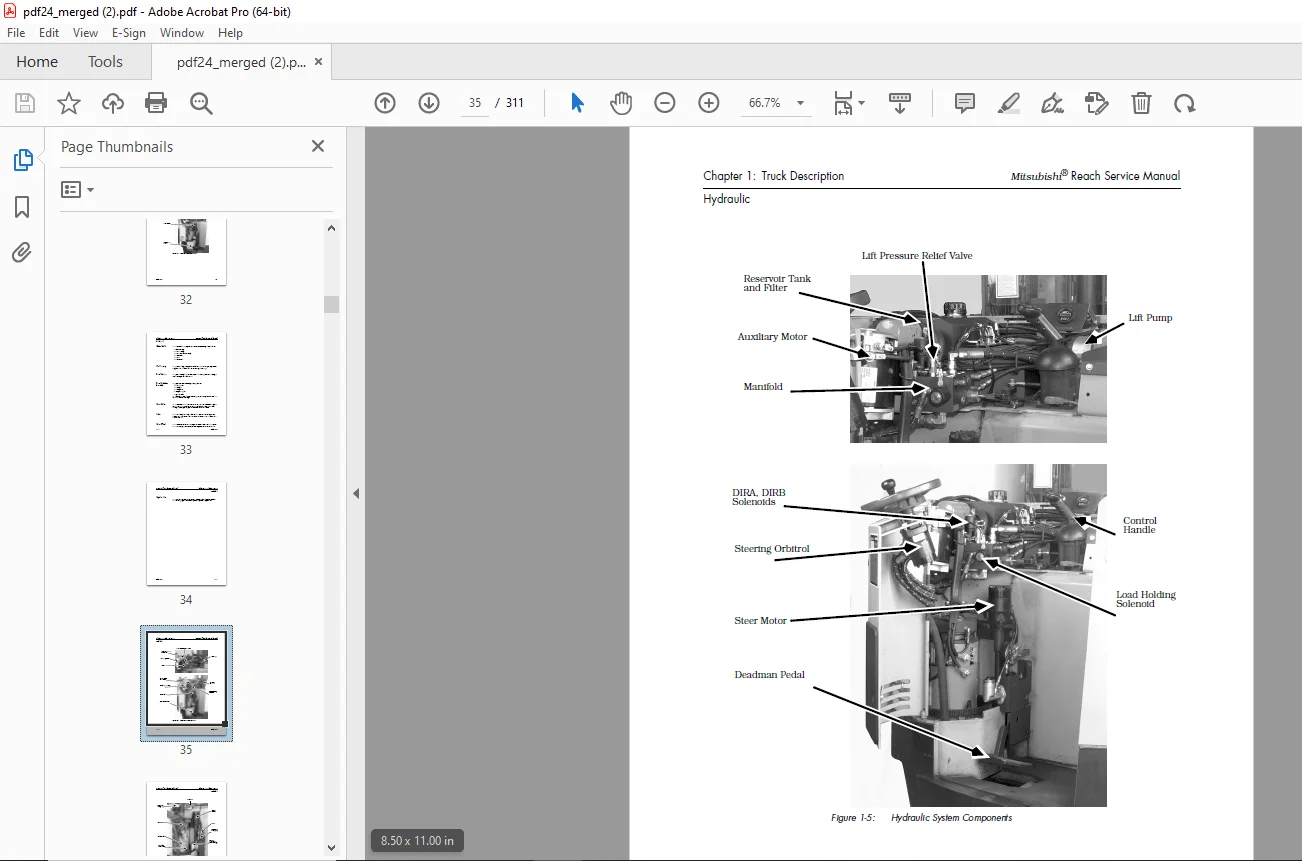
Hydraulic . 1-11
Lift/Lower System 1-14
Lift Pump 1-14
Lift Motor 1-14
Lift Cylinder Assembly 1-14
Reservoir 1-15
Return Line Filter 1-15
Lift Chain 1-15
Lift/Lower Hydraulic Manifold Assembly. 1-15
Solenoids 1-16
Electrical1-17
System Displays1-19
Operator’s Display Indicator (ODI)1-19
Maintenance Displays. 1-19
Electronic Control System 1-19
Interface Card Assembly . 1-20
Travel System . 1-20
EV100LX Solid-State Control System . 1-20
Drive Motor. 1-22
Travel Contactors 1-22
Lift/Lower System 1-22
Lift Motor 1-22
P Contactor. 1-22
Load Holding Solenoid 1-22
Steering System1-23
Auxiliary Motor1-23
X Contactor 1-23
Control Handle 1-24
Deadman Pedal (Switch S2). 1-24
Emergency Disconnect 1-24
Key Switch (S1)1-24
Installation2-1
Overview. 2-1
Warranty Coverage. 2-1
In this Chapter2-1
Inspecting the Truck2-2
How the Truck is Shipped . 2-2
Reasons for Doing a Visual Inspection 2-2
What to Look For 2-2
Repairing Shipping Damage 2-2
Repairing Defects2-3
Uprighting a Cradled Truck. 2-5
Warnings and Cautions . 2-5
Mitsubishi® Reach Service Manual Table of Contents
PDMM-0058 ix
Items Needed . 2-5
Option 1: Uprighting with Two Chain Hoists2-6
Option 2: Uprighting with One Chain Hoist and a Lift Truck2-7
Assembling the Truck . 2-8
Removing the Gaskets 2-8
Greasing the Mast Uprights 2-8
Installing the Battery . 2-9
Doing a Functional Inspection2-10
Who Does the Inspection . 2-10
What Needs to be Done 2-10
Starting the MitsubishiWarranty. 2-10
Reporting Repairs 2-10
Using the Checklist . 2-10
Preparing the Truck for Cold Storage. 2-12
Classes of Cold Storage 2-12
Types of Oil . 2-13
Changing the Hydraulic System Oil . 2-14
Preparing the Truck for Storage. 2-14
Storage Warranty. 2-14
General Storage Tips 2-14
Hydraulic System. 2-15
Hydraulic Cylinders . 2-15
Lift Chains2-15
Mast Uprights . 2-15
Electronics2-15
Motors . 2-15
Battery. 2-16
Operating Instructions . 3-1
In this Chapter 3-1
EV100LX Operator System Display . 3-1
Display Test3-2
Hour Meter 3-2
Battery Charge Level . 3-2
Status Codes . 3-2
Informational Messages 3-2
Performance Limiting Codes . 3-3
Fault Codes . 3-3
Operator’s Daily Checklist3-4
Visual Checks 3-4
Operational Checks 3-4
Start-up Procedure 3-5
Forward/Reverse Travel 3-5
Braking. 3-6
Plugging 3-6
Parking. 3-6
Entering an Aisle . 3-6
Table of Contents Mitsubishi® Reach Service Manual
x PDMM-0058
Operating the Truck on a Ramp 3-7
Travel Speed and Lift Limits . 3-7
Theory of Operation . 4-1
In this Chapter 4-1
EV100LX Control Panel4-1
System Components 4-3
Silicon Controlled Rectifiers (SCR) . 4-3
#1 Rectifier (REC1) Chopper SCR . 4-3
#2 Rectifier (REC2) Commutating SCR . 4-3
#5 Rectifier (REC5) Charging SCR. 4-4
Diode Rectifiers . 4-4
#3 Rectifier (REC3) Free Wheeling. 4-4
#4 Rectifier (REC4) Plugging . 4-4
Reactor (Coil T3/T4) . 4-4
Capacitor 1-C 4-4
Filters REC22, REC23, REC24, REC25 . 4-5
Thermal Protector (TP) 4-5
Sensor (Sensor 1)4-5
Control Features. 4-6
Creep Speed4-6
Controlled Acceleration . 4-6
Current Limit. 4-6
Plugging. 4-6
1A Current Dropout4-7
Speed Limit 1 (SL1) and Speed Limit 3 (SL3) . 4-7
Static Return to OFF . 4-7
Accelerator Volts Hold-Off . 4-8
Coil Driver Modules 4-8
Thermal Cutback4-8
Pulse Monitor Trip (PMT) 4-9
Internal Resistance Compensation . 4-9
Steer Pump Time Delay 4-10
Stored Fault Code 4-10
Battery Discharge Indicator . 4-10
Hour Meter . 4-10
On-board Diagnostics . 4-10
Basic SCR Controller Circuit Operation. 4-11
Energizing the Control Circuit . 4-11
Gate Pulse to REC2 . 4-11
Gate Pulse to REC1 . 4-11
Firing REC2. 4-11
OFF Time. 4-12
Oscillation Frequency4-12
Oscillator Features4-12
Wiring Conventions4-13
Operation of the Travel System . 4-14
Mitsubishi® Reach Service Manual Table of Contents
PDMM-0058 xi
Sequence 1: Truck at Rest 4-15
Sequence 2: Connect the Battery . 4-15
Sequence 3: Closing the Key Switch and the Deadman Pedal 4-16
Sequence 4: PMT Test . 4-16
Sequence 5: Directional Contactor Closure4-17
Sequence 6: REC1 Turn ON. 4-18
Sequence 7: REC5 Turn ON. 4-18
Sequence 8: Reverse Charging the 1C Capacitor4-19
Sequence 9: REC2 Turn ON and REC1 Turn OFF. 4-19
Sequence 10: Free-Wheeling Current 4-20
Sequence 11: 1A or Bypass Contactor Operation . 4-21
Sequence 12: Controlled Plugging 4-22
Lift/Lower System. 4-23
System Overview . 4-23
Unique System Features . 4-23
Components. 4-24
Functionality 4-24
Braking. 4-25
Maintenance. 5-1
General Maintenance Instructions5-1
In this Chapter5-1
Maintenance Practices 5-2
Jacking the Truck . 5-3
Welding Procedures 5-4
Electrostatic Discharge Damage 5-4
Proper Handling of Static Sensitive Devices5-5
Discharging the Truck . 5-6
Removing the Circuit Card 5-6
Removing an Integrated Circuit (IC)5-8
Installing a New Integrated Circuit 5-9
Removing a Pin. 5-9
Troubleshooting with the Cable Connector Breakout Board. 5-10
Fuses5-10
Shunt Locations5-11
Planned Maintenance 5-12
Service Manual 5-12
Planned Maintenance Schedule 5-12
Time Requirements . 5-12
Planned Maintenance Checks5-13
Inspection Schedule 5-16
Grease Fitting Locations5-19
Battery Maintenance. 5-20
How Batteries Get Damaged. 5-20
Removing a Battery . 5-21
Installing a Battery . 5-21
Cleaning the Battery 5-22
Table of Contents Mitsubishi® Reach Service Manual
xii PDMM-0058
Testing the Battery Electrical Leakage To Frame5-22
Battery Discharge Indicator (BDI). 5-23
Internal Resistance Compensation . 5-23
Adjusting the Internal Compensation . 5-24
Charging the Battery 5-26
Precautions. 5-26
Using the Hydrometer. 5-27
Checking the Specific Gravity . 5-27
Voltage Check . 5-28
Adding Water to the Battery. 5-28
Keeping a Battery History Record. 5-29
Maintaining the Motor5-30
Motor Cleaning 5-30
Brush Care . 5-31
Cleaning the Brushes . 5-32
Measuring the Brush Spring Tension . 5-33
Replacing a Brush . 5-33
Preventing the Motor from Overheating 5-34
Checking the Torque on the Motor Stud Terminals . 5-34
Open Circuits5-35
Testing for Open Circuits 5-35
Short Circuits . 5-36
Testing for Short Circuits 5-36
Armature Shorts . 5-37
Checking for Armature Shorts. 5-37
Grounded Motors. 5-37
Testing for a Grounded Motor . 5-37
Truck Grounds—General . 5-38
Testing for Grounds on the Truck Frame 5-38
Hydraulic System Maintenance . 5-39
Selecting the Oil5-39
Changing the Reservoir Fluid5-39
Checking the Reservoir Fluid Level5-40
Changing the Reservoir Filter5-40
Bleeding the Hydraulic System. 5-41
Mechanical Maintenance5-42
Power Section . 5-42
Drive Unit Service5-42
Removing the Drive Unit . 5-43
Installing the Drive Unit . 5-44
Preparing to Replace the Drive Axle Seal (36-Volt) 5-45
Replacing the Drive Axle Seal (36-Volt) 5-45
Preparing to Replace the Drive Axle Seal (24-Volt) 5-51
Disassembling the Drive Unit (24-Volt) 5-52
Assembling the Drive Unit (24-Volt). 5-53
Braking System 5-57
Braking Process . 5-57
Adjusting Nut-Retained Style Brakes5-59
Mitsubishi® Reach Service Manual Table of Contents
PDMM-0058 xiii
Inspecting the Brake Pad 5-61
Bleeding the Brake . 5-61
Adjusting the Deadman Pedal . 5-62
Replacing the Brake Master Cylinder . 5-65
Replacing the Brake Pads 5-65
Brake Installation5-67
Reassembling the Brake . 5-68
Replacing the Brake O-Ring Seal. 5-69
Steering System5-73
Steering Adjustment with Steerable Caster . 5-73
Initial Adjustments . 5-73
Adjusting the Casters . 5-74
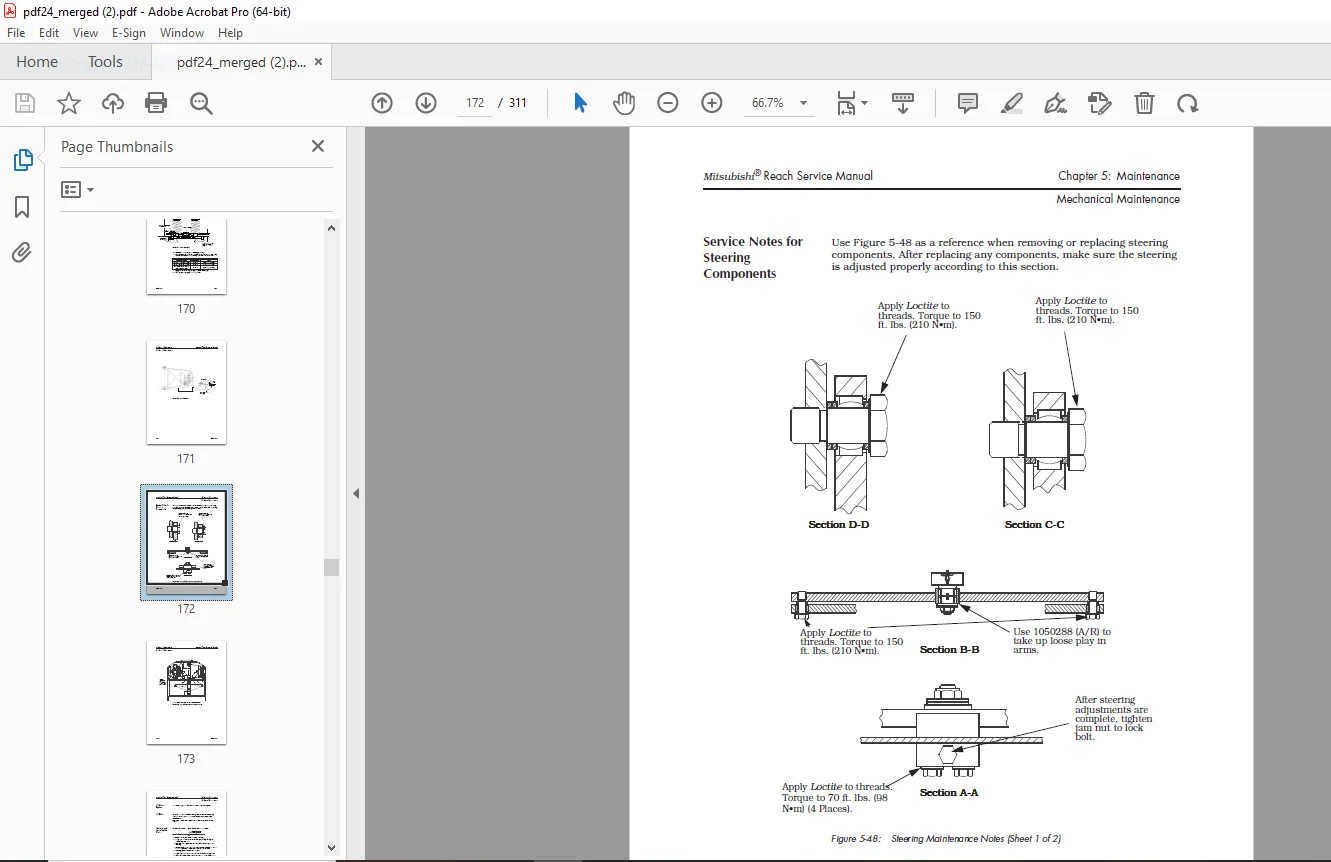
Service Notes for Steering Components 5-77
Lift/Lower System 5-79
Lift Chains . 5-79
Removing and Inspecting the Chain 5-79
Lubricating the Lift Chain5-81
Adjusting the Over the Mast Hose and Cable5-82
Replacing the Over the Mast Hose5-85
Replacing the Flow Control 5-87
Adjusting the Equalization Chain 5-89
Equalization Chain Removal and Installation . 5-91
Replacing the Equalization Chain Sheave 5-92
Applying Loctite® to the Reach Carriage Chain Anchors . 5-93
Adjusting the Mechanical Stop 5-93
Reach Carriage Lubrication Points . 5-94
Removing the Fork Carriage Tilt Pins . 5-94
Attaching the Mast to the Tractor 5-95
Adjusting the High Pressure Relief Valve . 5-96
Troubleshooting 6-1
In this Chapter 6-1
Troubleshooting Procedure . 6-1
Verifying Problems . 6-1
Locating the Problem Area . 6-2
Establishing a Logical Testing Sequence. 6-2
Identifying the Cause of the Problem . 6-2
Correcting the Problem . 6-3
Electrical. 6-4
Checking the Wiring6-4
Troubleshooting Procedure 6-4
Shorts to the Truck Frame—Causes . 6-5
Shorts to the Truck Frame—Checking6-5
Voltage To Frame—Causes 6-6
Voltage To Frame—Checking. 6-6
Voltage to Frame—Eliminating . 6-6
Board and Component Swapping Precautions 6-7
Table of Contents Mitsubishi® Reach Service Manual
xiv PDMM-0058
Troubleshooting Order for Component Failure . 6-7
Handling Printed Circuit Cards. 6-7
Cleaning and Inspecting the Contactors 6-8
Contactors Specifications . 6-9
Testing Other Electrical Components . 6-10
EV100LX Component Tests. 6-10
Hydraulics 6-12
Checking for Hydraulic Leaks6-12
Maintenance Tips. 6-15
Avoiding Hydraulic Problems . 6-16
Lift/Lower Hydraulic System Troubleshooting. 6-16
Steps for Locating Problems in the Lift/Lower System. 6-17
Pump Problems6-18
EV100LX Codes and Tests 6-20
Troubleshooting the EV100LX Solid-State Control System 6-20
Identifying a Malfunction 6-20
Replacing the Logic Card. 6-20
Wire Numbers. 6-20
Jacking the Truck6-20
Accessing the Terminals . 6-21
Visual Check6-21
Using the LX Handset . 6-23
Operating the Handset 6-23
Function Set-Up Procedures 6-25
Handset Programmable Functions . 6-25
System Voltage Drop vs. Function Setting 6-30
GE Status Codes . 6-31
Status Code – Blank Display 6-32
Status Code – 01. 6-34
Status Code – 02. 6-36
Status Code – 03. 6-38
Status Code – 04. 6-40
Status Code – 05. 6-42
Status Code – 06. 6-44
Status Code – 07. 6-46
Status Code – 08. 6-48
Status Code – 09. 6-50
Status Code – 15. 6-52
Status Code – 16. 6-53
Status Code – 17. 6-54
Status Code – 23. 6-55
Status Code – 24. 6-56
Status Code – 25. 6-57
Status Code – 41. 6-58
Status Code – 42. 6-59
Status Code – 43. 6-60
Status Code – 44. 6-61
Status Code – 45. 6-62
Mitsubishi® Reach Service Manual Table of Contents
PDMM-0058 xv
Status Code – 46. 6-63
Status Code – 47. 6-64
Status Code – 48. 6-65
Status Code – 49. 6-66
Status Code – 50. 6-67
Status Code – 51. 6-68
Status Code – 52. 6-69
Status Code – 53. 6-70
Status Code – 54. 6-71
Status Code – 57. 6-72
Troubleshooting the Interface Card System6-73
Running Learn. 6-73
Setting up the Truck 6-73
Interface Card Switch Settings . 6-75
Interface Card Assembly . 6-76
Interface Card Codes 6-77
Code 0 6-78
Code 1 6-78
Code 2 6-79
Code 3 6-79
Code 4 6-79
Code 5 6-80
Code 7 6-80
Code 8 6-81
Code 9 6-82
Code C 6-82
Code E 6-83
Code F 6-83
Code H 6-84
Code J 6-84
Code L 6-85
Code U 6-85
Troubleshooting the Interface Card6-86
Display on Interface Card is Dark. 6-86
No Auxiliary Functions; Aux. Motor Runs; Other Functions OK 6-86
Auxiliary Motor Does not Run; Other Functions OK . 6-87
One Auxiliary Function Is Inoperative . 6-87
Auxiliary Functions Operate In Only One Direction: Steering OK . 6-88
No Lift. 6-88
No Lower. 6-88
No Travel, Other Functions OK. 6-88
No Speed Limit. 6-91
No Lift Inhibit6-92
Charts and Schematics. A-1
Lubrication Equivalency Chart A-2
Torque Chart – Standard (Ferrous) . A-5
Table of Contents Mitsubishi® Reach Service Manual
xvi PDMM-0058
Torque Chart – Standard (Brass) . A-6
Torque Chart – Metric (Ferrous)A-7
Torque Chart – Metric (Brass) . A-7
Decimal Equivalent Chart A-8
Standard/Metric Conversions A-10
Electrical Schematic . A-13
Hydraulic Schematic. A-18
Decal Locations. A-19
Pin-By-Pin Voltages – EV100LX Travel Control System . A-21
EV100 Interface Card Troubleshooting Relationships A-27
Brush ReplacementA-28
G.B 27/01/25